
What Does a Monitor Arm Do? More Desk Space, Better Posture and Easier Teamwork
23 Oct 2026 · 5 min read · By the ChelseaGREEN team
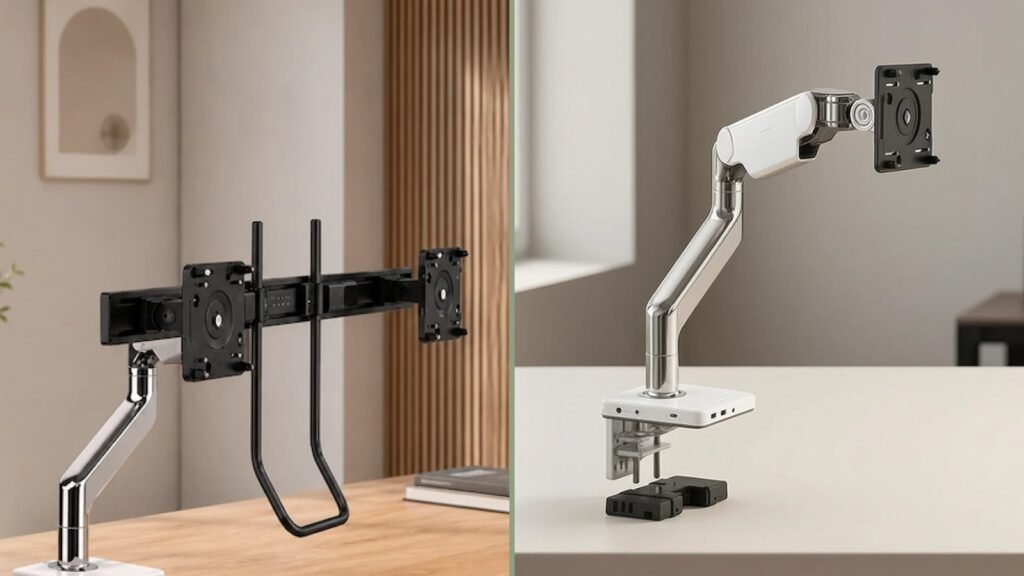
Quick answer: A monitor arm clamps to the edge of your desk and holds your screen in the air. It frees the desk space the monitor stand used to take, lets you set the screen at exactly the right height and distance for your eyes and neck, and lets you swing the screen round in seconds to show it to a colleague or client.
Most monitors come with a fixed stand that sits in the middle of the desk and only tilts a little. That stand decides where your screen goes, and usually it is too low, too close or both. A monitor arm puts you in charge of where the screen sits.
1. It frees up your desk
A standard monitor stand takes up a footprint of roughly 20 x 25 cm, right in the centre of the desk where you need space most. Two monitors double that. A monitor arm clamps to the back edge of the desk or fixes through a cable grommet, so the screen floats above the surface.
What you get back:
- Room for paperwork, drawings, a notebook or a laptop in front of you.
- A clear surface that is quicker to clean and looks tidier on video calls.
- Cables that run along the arm instead of trailing across the desk.
- On a small home desk or dining table, enough space to work properly at all.
2. It makes your workstation ergonomic
Neck and shoulder ache at a desk usually comes from a screen that is too low, so you lean forward and look down for hours. Ergonomic guidance, such as OSHA’s computer workstation checklist, gives three simple rules for screen position:
- Height: the top of the screen at or slightly below eye level, so you look slightly down at the middle of it.
- Distance: about an arm’s length away, roughly 50 to 75 cm for most people.
- Straight ahead: the screen you use most sits directly in front of you, not off to one side.
A fixed stand rarely meets all three. Books and boxes under the stand fix the height but not the distance. A monitor arm meets all three, and it keeps meeting them when things change:
- When you switch between sitting and standing, the screen moves up with you. That matters on a sit-stand desk.
- When more than one person uses the desk, as in hot-desking, each person can reset it in seconds.
- When you lean back to read or take a call, you can pull the screen towards you instead of leaning in.
- When you read long documents or code, you can turn the screen to portrait.
3. It turns your screen into a collaboration tool
This is the benefit most people do not expect. With a fixed stand, showing someone your screen means they come round behind your chair and lean over your shoulder. With a monitor arm you simply swing the screen round:
- Quick reviews at your desk: turn the screen towards a colleague across the desk to go through a drawing, a spreadsheet or a design.
- Client meetings: in a showroom, reception or sales office, swing the screen to face the client while you walk them through a quote.
- Bench desks and shared workstations: on a double bench desk, a screen on an arm can be pulled to the middle so two people work on the same document.
- Video calls at home: angle the screen and its camera so the light falls well and the background is the one you choose.
When you are done, push the screen back to your own working position. Good arms hold that position without re-tightening anything.
Single or dual monitor arm?
| If you… | Choose |
|---|---|
| Work on one screen, or a laptop plus one screen | A single monitor arm |
| Work on two screens side by side | A dual arm on a crossbar, which keeps both screens level and lined up |
| Share your desk or switch users often | An arm with tool-free, easy adjustment |
With two screens used equally, centre the join between them in front of your nose. If you use one screen most of the time, put that one straight ahead and the second off to the side.
Monitor arms at WorktoolsUAE
- Humanscale M2.1 Adjustable Monitor Arm: a compact single arm with up to 305 mm of height adjustment and tool-free quick-release joints. A good fit for home offices.
- Humanscale M8.1 Adjustable Monitor Arm: Humanscale’s flagship single arm, with a longer reach for deeper desks.
- Humanscale M8.1 Dual Monitor Arm with Crossbar: two screens on one arm, kept level on a crossbar.
All three carry Humanscale’s 15-year warranty. See the full range in Monitor Arms.
Frequently asked questions
Will a monitor arm fit my desk?
Most arms clamp to a desk edge between about 1 and 6 cm thick, or fix through a cable hole. Check that there is no lip or drawer directly under the clamping point. Glass desks need a reinforcing plate.
Will a monitor arm fit my monitor?
Most monitors have four screw holes on the back in a VESA pattern of 75 x 75 mm or 100 x 100 mm. If yours does, an arm will fit. Some slim monitors need an adapter.
Is a monitor arm worth it if I work from home?
Yes, often more than in an office. Home desks and dining tables are usually small, and a monitor arm gives back the desk space while putting the screen at a healthy height.
Can I use a monitor arm with a laptop?
Yes. Put the laptop on a stand beside the monitor and use a separate keyboard and mouse. The monitor on the arm becomes your main screen.
Do monitor arms help neck pain?
They help with neck strain caused by a screen that is too low or too close, because they let you set the screen at eye level and arm’s length. If pain continues, see a doctor or physiotherapist.
Can WorktoolsUAE install the monitor arm?
Yes. Our team can install your monitor arm, fix it securely to your desk and set the screen at the right height for you. Ask for installation when you order, or call +971 4 566 7393.
See them in person at the ChelseaGREEN showroom, M9, Al Joud Centre, Sheikh Zayed Road, Al Quoz Industrial 1, Dubai, or call +971 4 566 7393.